Installation and settings
Connecting and mounting JUNG HOME switch actuator 1-gang mini with 2 binary inputs
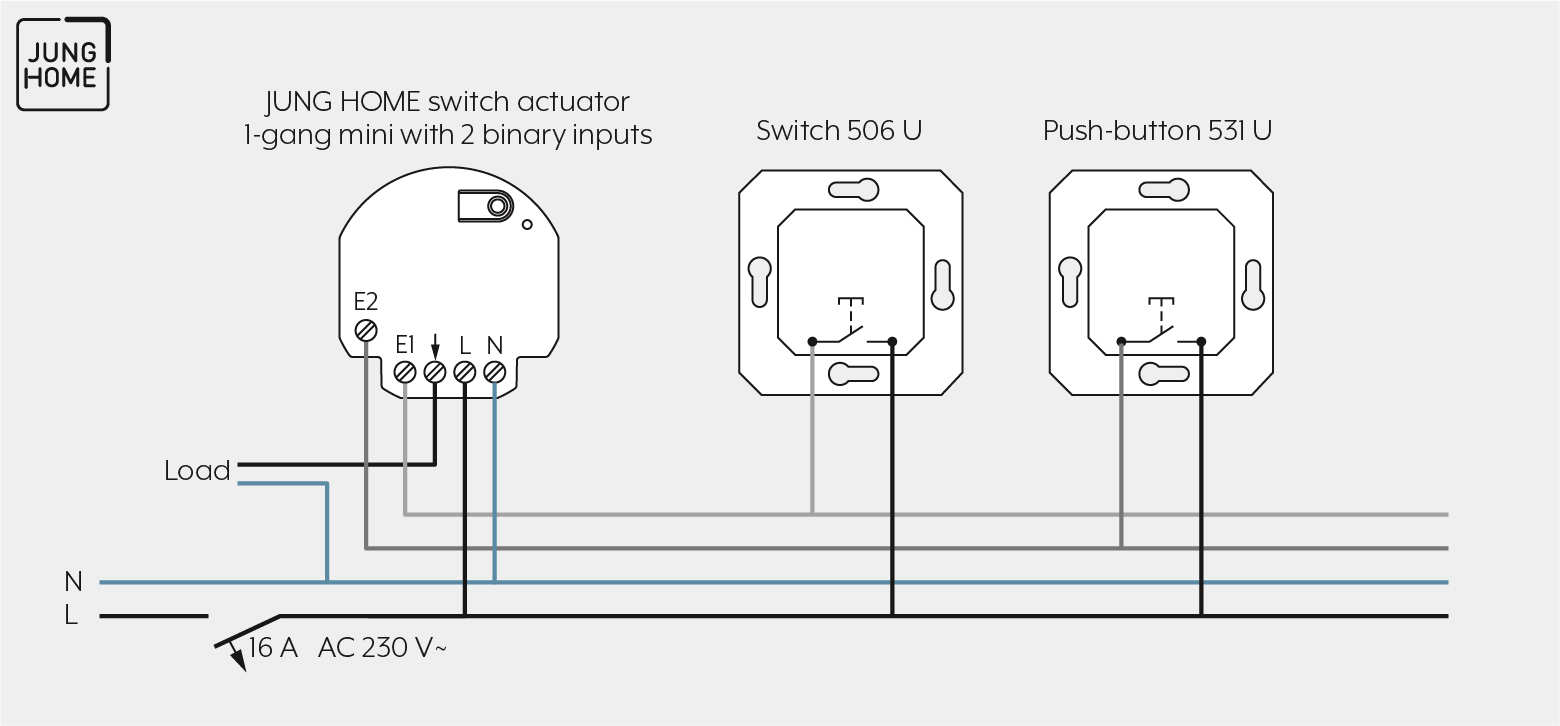
Note the following for the mounting:
Proceed as follows for mounting:
- Connect the JUNG HOME switch actuator 1-gang mini with 2 binary inputs in accordance with the wiring diagram.
Note the clampable conductor cross-sections. Illuminated push-buttons must have a separate terminal for N conductor in addition. - Position the JUNG HOME switch actuator 1-gang mini with 2 binary inputs in the wall box such that the Prog button and the status LED are visible.
- Switch on the mains voltage.
- Briefly press the Prog button to switch the load.
- Mount the appropriate cover.
CLAMPABLE CONDUCTOR CROSS-SECTION | |
|---|---|
| 1 x 0.5 … 2.5 mm² |
| 1 x 0.5 … 2.5 mm² |


Commissioning
For how to commission the JUNG HOME switch actuator, 1-gang mini with 2 binary inputs using the JUNG HOME app, see Chapters "Pair device" and "Configure JUNG HOME mini devices".