Glossary
A
AES-128
The Advanced Encryption Standard (AES) is an encryption method with variable block and key lengths of 128 bits independent of each other. The standard provides a high level of security.
Ambient brightness
Brightness in the immediate vicinity of a JUNG HOME device. If the ambient brightness is higher than the set brightness threshold, various functions cannot be activated, such as switching on the light.
Astro time
The astro times are the sunset and sunrise times based on the geographical location and the current date. Can be set using the JUNG HOME app.
Astro timer
The astro timer is one of the many functions of the JUNG HOME devices. It enables connected devices to switch on or off at sunrise and sunset times, or defined times relative to these events. The astro timer offers various setting possibilities. In the factory setting, the astro timer is deactivated. The time shift is one of the other setting possibilities for the astro timer. With this function, the switching time of the loads can be shifted by a specified value. For example, it can be set up so that the garden lighting will be switched off at 21:00 at the latest, even if sunset is not until 22:00. The astro timer is based on the geographical location of the project. In order to be able to correctly calculate the sunrise and sunset times, the geographical location must be specified in the JUNG HOME devices. The calculation is made once a week.
Astro timer threshold
The astro timer threshold is used to limit the time range of the astro timer to an earliest and/or latest execution time. The threshold is independent of the sun position times (sunrise and sunset). For example, if the sun rises in the summer at 5 am, but I don't want the shutter or the blind to open before 7 am
Astro timer time shift
The astro timer time shift is a function integrated into the JUNG HOME devices. It enables on and off switching times for the load to be shifted by a personally selected time (in minutes). If there is a need to run the time program in the morning before dawn or only when it is completely bright, this can be implemented using the "sunrise" shift. If there is a need to run the time program in the evening before twilight or only when it is completely dark, this can be implemented using the "sunset" shift. This offers the user flexibility to adjust the time range. The time shift can be set in the application and adapted as required
B
Ballast
Ballasts are used for current limiting and for starting lamps. A ballast is required for lamp operation because LEDs and/or fluorescent lamps are not suitable to connect directly to the mains supply.
Behaviour after mains voltage return
The "behaviour after voltage return" parameter refers to the behaviour of the JUNG HOME devices after a power failure and the subsequent return of mains voltage. Note: do not use the "Switched on" setting in combination with electrical loads that can lead to physical danger or to property damage. If the parameter is set to the factory setting, the load output of the JUNG HOME SCHUKO® socket after the voltage return will be switched off, for example. That means, the connected devices will initially not be provided with power. All settings made and time programs set up for the JUNG HOME device are retained. However, missed switching times are not executed, which means that the planned switching operations during the power failure are not carried out. It is important to note that this behaviour only occurs if previously the JUNG HOME device was not yet added to a Bluetooth® MESH network using the JUNG HOME app. In this case, the JUNG HOME device will go into pairing mode for 2 minutes after the voltage return and the status-LED will slowly blink blue continuously. By setting the "behaviour after voltage return" parameter, therefore, the behaviour of the JUNG HOME device after a power failure can be individually adapted.
Brightness threshold
The brightness threshold is a value below which the load is switched on when a movement is detected. In "Daytime operation" setting, the device reacts to every movement of brightness-independent.
Brightness value
Value that specifies the brightness that a lamp is set to when it is switched on. The brightness value can be configured using the JUNG HOME app.
C
Central functions (scenes)
With central functions, various devices and areas can be individually brought together into a centrally controlled action, e.g. "Everything off".
Cloud service
A cloud service offers the possibility of storing, editing and reading files centrally on a server. Cloud services such as Alexa, Google Home and Samsung SmartThings are comparable to connected computer networks. There are thus a variety of possibilities for the user for software applications (e.g. voice control) and linking to other manufacturers.
D
Detection range
The area/field within which a JUNG HOME motion detector or JUNG HOME presence detector detects movements and as a result calls scenes or switches lights on or off. The detection range can be configured using the JUNG HOME app. With the help of satellite units and other JUNG HOME motion detectors, a detection range can be extended.
Detection range
The area/field within which a JUNG HOME motion detector or JUNG HOME presence detector detects movements and as a result calls scenes or switches lights on or off. The detection range can be configured using the JUNG HOME app. With the help of satellite units and other JUNG HOME motion detectors, a detection range can be extended.
Disabling function (forced guidance)
The disabling function with forced guidance is a parameter available in JUNG HOME devices. This function enables the initial state of the JUNG HOME device to be specified and to protect this against changes by motion sensors, satellite insert operation, time programs, the app or other JUNG HOME devices. There are various setting possibilities for the disabling function: 1. Deactivated: in this mode, the disabling function is switched off and the JUNG HOME device can be operated normally. 2. Continuous ON/continuous OFF: in this mode, the load output is switched to the desired state (on or off) and remains fixed in this state. 3. ON/OFF for fixed time: for this a certain time can be set during which the disabling function is to be active. During this time, the state of the JUNG HOME device remains unchanged. The factory setting of the disabling function is "deactivated", which means that the JUNG HOME device can be normally controlled as standard. It is important to note that the disabling function should be used with forced guidance in order to prevent potential dangers for people or damage to devices. It can be useful, for example, to ensure that certain devices have to always remain switched on or to prevent accidental changes to the device state. The settings for the disabling function can be made in the app or using other control methods, depending on which options are available for the JUNG HOME device.
E
Electric underfloor heating system
With an underfloor heating system, electrical energy is transformed into heat using special heating mats or heating films installed in the flooring. Alongside the integrated room temperature sensor, an external temperature sensor is connected to the room thermostat insert that monitors the temperature of the floor.
Electrothermal valve drive
The electrothermal valve drive for 230 V or 24 V is used to close or open standard valves and small valves. It is used for panel heating and heating manifolds or mounted directly to the radiator.
Encrypted wireless communication
Type of communication in the Bluetooth® MESH network protocol with which the data are protected from access by third parties and transmitted confidentially due to their encryption.
Energy consumption and operating hours of the load switched on
The measurement of energy consumption relates to the amount of electrical energy that is used by devices connected to the JUNG HOME SCHUKO® socket Energy and the JUNG HOME Puck switch actuator 1-gang Energy with 2 binary inputs. The consumption is given in kilowatt-hours (kWh). With this information, the amount of energy a certain device consumes or the length of time a device is in operation on average can be determined, for example. This enables the electricity consumption to be optimised, energy costs to be reduced and to act more environmentally consciously. The operating hours when the load is switched on give the total time the connected devices were switched on since the last reset of the counter. The energy consumption for the last 24 hours and the last 31 days are displayed graphically in the JUNG HOME app. To do so, the measured power for the last 24 hours are averaged for each 60 minutes and for the last 31 days for each 24 hours and displayed as active energy in kWh.
Energy consumption data
The JUNG HOME SCHUKO® socket Energy has an integrated power (in watt) and energy measurement (unit of measurement kilowatt-hour - kWh), which is visualised with the JUNG HOME app.
Energy measurement (kWh)
With the energy measurement, the electrical work over a certain time is recorded (units of kilowatt-hours - kWh).
Extended detection range
By joining multiple JUNG HOME motion detectors using Bluetooth® MESH, the detection range can be extended by up to ten motion detectors and thus spatially expanded. The JUNG HOME motion detectors being used as an extension are attached to a satellite insert 3-wire.
F
Frost protection temperature
The frost protection temperature is the minimum temperature that is regulated to prevent frost damage. When there is a large reduction of temperature, e.g. after a window is opened, the system switches to the frost protection temperature (factory setting 7.0 °C) for a maximum of 30 minutes. The temperature drop detection parameter must be activated for this.
H
Halogen bulbs
The halogen bulb is a special design of the incandescent lamp. These exist in the high-voltage (HV) for mains power or low-voltage (LV) for extra-low voltage. High-voltage, halogen bulbs are relatively easy to dim. Using a phase dimmer (leading edge phase control or trailing edge phase control, see "Dimming principles"), a part of the sinusoidal mains voltage is capped in each half-wave and thus the lamp is supplied with less effective voltage. Thereby, gaps occur in the power supply for a few milliseconds; however, these do not have any noticeable effects due to the thermal inertia of the filament. High-voltage halogen bulbs can theoretically be dimmed without restrictions. When dimming, high-voltage halogen bulbs change their colour temperature to warmer (lower) values and the life of the lamp increases significantly. The extra-low voltage halogen bulbs can also be easily dimmed using the same principle. However, it must be taken into account here that the ballast (transformer) that generates the required low voltage is also dimmable. Details for compatibility can be found in the device documentation from the transformer manufacturers.
Heat pump
Heat pumps are already today a smart solution for planners, owners and modernisers. As more and more attention is being focussed on renewable energies, regenerative electricity will take on more and more of a central role in energy generation. In combination with the JUNG HOME room thermostat display, heating with heat pumps is getting even more efficient.
Heating optimisation
The heating optimisation ensures that the desired room temperature has already been reached by the programmed time.
I
Incandescent lamps
The incandescent lamp is a so-called "thermal radiator". Current flows in the incandescent lamp through a thin thread that consists of conductive material – the filament. The filament is heated until it radiates yellow or white light.
Internal temperature sensor
The JUNG HOME room thermostat display has a built-in temperature sensor which is used to measure the room temperature.
J
JUNG HOME gateway
The JUNG HOME gateway is an optional interface to the IoT world in order to intelligently extend the JUNG HOME system and to control it conveniently. It connects the JUNG HOME devices with standard voice services such as Amazon Alexa, Google Assistant or SmartThings. Furthermore, the gateway forms the basis for integration into comprehensive server solutions such as the JUNG SV-Server, wibutler or Mediola. These systems extend JUNG HOME with powerful management functions: they enable the integration of numerous other manufacturers and systems, including Philips Hue and Sonos. In addition, they provide comprehensive functions for logic and time control, visualisation, data analysis (charting) and individual links and automations.
L
Leading edge phase control
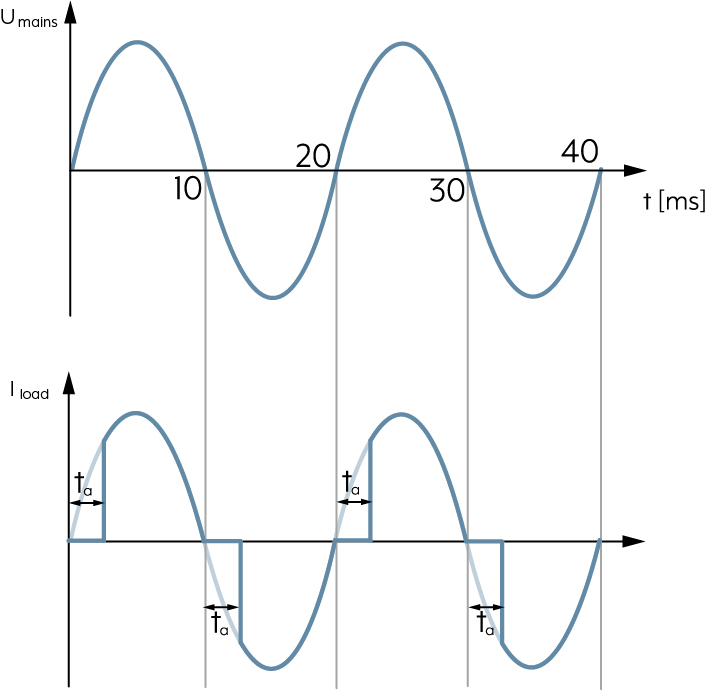
In the case of the leading edge phase control principle, the dimmer blocks the current to the lamp at the beginning of every sine half-wave. It is not conductive. The electronic switch in the dimmer is not switched through until after expiry of a configurable delay time and the connected lamps are energised. The current is removed with the next sine zero point and the lamp is switched off. This process is repeated in every sine half-wave, i.e. 100 times per second. The brightness of the connected lamps can be continuously adjusted using the delay time. The leading edge principle is suitable for ohmic and inductive loads, incandescent lamps or extra-low voltage halogen lamps with conventional (wound) transformer. There are also specially approved LED lamps for dimming according to the leading edge phase control principle.
LED lamps
Last but not least, due to the EU-wide ban of incandescent lamps in the framework of the Energy Saving Ordinance, LED lamps have spread rapidly in recent years. The actual light sources in LED lamps are light-emitting diodes that consist of semiconductor materials. LED lamps require significantly less energy than the classic incandescent lamp. Furthermore, LED lamps last significantly longer: assuming approx. 1,000 operating hours for incandescent lamps, the manufacturers of LED lamps typically state a lamp life of 20,000 – 50,000 operating hours. In contrast to incandescent lamps, LED lamps are very fast lamps that start to light immediately when the current is applied and extinguish without luminescence when the current is switched off. LED lamps can also be dimmed. While halogen lamps and incandescent lamps operate with alternating current, LED lamps need direct current. Light-emitting diodes are operated with operating voltages below 1 V. Therefore, LED lamps need a ballast –either as a separate product or integrated in the lamp. The tasks of the ballast are on the one hand reducing the mains voltage to LED-compatible values. On the other hand, they are the continuous power supply of the LED during the unavoidable supply gaps for leading or trailing edge phase control. If necessary the dimming process is also controlled via the ballast (PWM, for dimmable LED lamps) and the colour temperature adjusted. Dimmable LED lamps must be expressly labelled as "dimmable" to be able to be operated on leading and trailing edge phase control dimmers.
Locking time
If a movement detector has switched off the lighting, the movement detection is suppressed for a short locking time in order to prevent the movement detector recognising the cooling down lamps in the monitoring area as thermal movement and switching on again immediately. The required locking time is determined automatically by all movement detectors and is 0.3 to max. 3 seconds.
Lock-out protection
The lock-out protection ensures that the blind/shutter is locked for a previously defined time or with a button function. As a result, the blind/shutter remains in its current position and cannot be moved with the JUNG HOME app, via automations or with manual operation.
M
Main units
The main unit consists of one system insert and an appropriate JUNG HOME cover. Any number of non-illuminated installation buttons can be connected to the satellite unit terminal 1 of the master unit.
Manual switching off during run-on time
The "manual switching off during run-on time" parameter refers to the JUNG HOME devices. This function specifies whether it is possible to manually switch off the connected load during the run-on time. The run-on time refers to the period of time during which the JUNG HOME device remains active after switching on before it is automatically switched off. When the "manual switching off during run-on time" parameter is set to "on", the load can be switched off manually during the run-on time. This means that a person can operate the device (e.g. the JUNG HOME SCHUKO® socket) to switch off the connected load, e.g. light, before the run-on time has expired. When the parameter is set to "off", manual switching off during the run-on time is deactivated. This prevents a second person from switching off a connected load such as a light early before the run-on time has expired. Note: with an automatic stairway lighting controlled by JUNG HOME operating and/or sensor covers, this parameter should be set to "off" so that the light cannot be switched off by a second person.
Many-to-Many Bluetooth® connections
The many-to-many (Bluetooth®) connection describes multiple Bluetooth® devices that communicate with each other. The sender and receiver roles can be fulfilled by the same device in the Bluetooth Mesh network.
Mesh repeater function
Every JUNG HOME device with Bluetooth® MESH is simultaneously a Bluetooth® MESH receiver and transmitter. If multiple Bluetooth® MESH devices are paired with each other, the range in interiors can be increased through the distance between the devices used - because each Bluetooth® signal received is also automatically passed on (transmitted).
Minimum motor reversal time
To prevent overvoltage occurring that could damage the system insert or motor when the running direction is reversed while it is moving up or down, there is a pause in movement of approx. one second between the switching off and switching back on of the motor.
Minimum switching repeat time
The minimum switching repeat time is a parameter that can be set for JUNG HOME devices. It specifies the minimum time that has to lie between two sequential switching processes of JUNG HOME devices. This parameter is useful to adjust the switching speed of the device and to avoid damaging the connected load. By increasing the value of the minimum switching repeat time, the switching speed is reduced, which means the JUNG HOME device is not switched on and off too quickly. This can be helpful, for example, to avoid overloading the connected devices or to reduce disruptive switching for certain applications. It is important to note that the last command lying within the switching repeat time will be executed with a delay. The switching repeat time starts from the beginning after each switching operation. The factory setting for the minimum switching repeat time is normally 100 ms, but it can be lengthened within the range of 100 ms to 10 s.
Motion detection
The motion detection with the JUNG presence detectors uses three independent passive infra-red sensors. The sensitivity of the sensors can be adjusted separately.
N
Night mode
Night mode is a function that is available in the JUNG HOME SCHUKO® socket and the JUNG HOME push-button. With activated night mode, the status LED does not light continuously, but only for a maximum of 5 seconds after an operation. This function is used to prevent a disturbing light from the status LED when it is dark or during the night. In this way, unwanted illumination of the bedroom or other rooms by the LED is prevented. It should be noted, however, that with night mode activated it is not clear whether the device is switched on or there is mains voltage at the connected load. The night mode can be activated or deactivated in the app or using other control methods, depending on the individual needs and preferences of the user.
O
Operating concept (rocker, push-button, scene)
With the operating concept, the function and button allocation of the JUNG HOME push-button can be tailored.
Operating hours counter
The operating hours counter records all time intervals when the JUNG HOME socket Energy is switched on. Using the JUNG HOME app, the counter can be reset to "0", for example after changing the load.
Operating lock
The operating lock is a function integrated in the JUNG HOME devices. It enables local operation of the JUNG HOME device to be locked so that it can only be operated using the app. This function can be useful to prevent unauthorised use of the JUNG HOME device, for example in public areas or to protect children from accidentally switching devices on or off. The operating lock can be deactivated with the app at any time. This allows local operation of the JUNG HOME device to be enabled.
P
Pairing mode
In pairing mode, new JUNG HOME devices can be added to a Bluetooth® MESH network (project) using the JUNG HOME app. In pairing mode, the status LED for the JUNG HOME device blinks blue.
Power dissipation
The power loss is the difference between the input power and the output power of a device. The power loss is mostly released as heat flow.
Power measurement
Using the power measurement, the power used in watt (W) is displayed.
Power reserve
For mains operated clocks and timer switches, the mains-independent/battery-operated power supply of the clock is referred to as the power reserve.
Power save mode
Switching off of standby electrical loads. The limit value can be set using the JUNG HOME app.
Presence detector
Presence detectors are motion detectors that are typically installed in rooms where a person is present for longer periods of time. The primary goal of the presence detector is to save energy and to switch off or dim the room lighting when no person is present. The presence detector must also be able to recognise small and sporadic movements for this. In this application, the light must also be able to be switched off manually. Presence detectors can be switched off as required and then ignore movements in the detection range. Presence detectors measure the ambient brightness and thus make automatic lighting control even more intelligent: they can be configured such that the lighting is only switched on when movement is detected when additionally the brightness is below a set brightness (brightness threshold). The JUNG HOME presence detector can be used as an observer. If the observer detects presence, it can, for example, switch a camera or an alarm loud (acoustic signal) or silent (visual signal).
Project synchronisation
With the project synchronisation, JUNG HOME projects can be synchronised with up to 9 other users or mobile devices. All devices present, such as luminaires, blinds and sockets, are then displayed in the apps and can be operated by the participants. In addition, an admin can add additional devices and create and edit scenes, areas and automations. All changes in the project made by the admin, such as renaming, or adding JUNG HOME devices, as well as changes in device configurations, are automatically synchronised with all participants.
Puck
The JUNG HOME Pucks enable simple and budget-conscious extension of the electrical installation. The Pucks switch and dim lighting, move blinds, shutters and awnings, control cooling and heating applications, measure energy use or switch electrical loads. Every Puck has two, separately usable, binary inputs. Furthermore, the portfolio gets a battery-operated Puck, that offers further application possibilities, such as polling window contacts. The low height simplifies installation in flush-mounted and electronics boxes, cavity wall boxes behind push-buttons, baldachins, false ceilings, roller shutter housings or in the distribution box.
Pulse width modulation (PWM)
Optimised for electrothermal valve drives, e.g. TSA 230 NC WW. The output is not continuously activated, but for a certain time (pulse width), which depends on the temperature difference between the setpoint and actual temperature. With this method, the actual temperature is increasingly approaching the setpoint temperature. The cycle time is 15 minutes.
Push-button
A device of the electrical installation with an operating element that is actuated by pressing and then returns to the starting position. The electrical contact is only closed for the duration of the actuation. An example for this is the actuation of a bell button. The doorbell can be heard while the bell button is kept pressed. As soon as the bell button is released, the doorbell can also no longer be heard.
R
Radial movement direction
Movement direction that is towards the JUNG HOME motion detector or the JUNG HOME presence detector in a straight line. With radial movements, the detection range is smaller than with tangential movements.
Remote sensor
An external temperature sensor can be connected to the room thermostat insert. The external temperature sensor is used for external temperature measurement.
Repeater
A repeater in the JUNG HOME system extends the range of the Bluetooth® MESH network by forwarding radio signals received between devices, thus enabling stable, wireless communication even over large distances.
Run-on time
The run-on time ensures that the load does not permanently remain switched on after a switch on command but is switched off at the end of the run-on time.
Run-on time (load)
The "run-on time (load)" parameter refers to the JUNG HOME devices and describes the setting for automatically switching off the connected load (e.g. lighting) after a particular time when it is switched on. With this parameter, the run-on time can be adapted to the load to save energy and increase convenience. For example, it can be set so that the lighting is automatically switched off after a specified time if it is no longer needed. This can be particularly useful to save energy if someone forgets to switch off the lighting.
S
Safety cut-off
The safety cut-off is a function of the JUNG HOME SCHUKO® socket in the case of overvoltage.
Scenes
With the JUNG HOME app, multiple devices and their functions can be combined into a "scene". In a scene, one or more functions from different function units (shading, light, temperature, sockets etc.) can be combined.
Set location
"Set location" refers to the function by which the user specifies the current location of their JUNG HOME devices. By setting the location, the device or the application can receive more accurate information about the geographical location. This is particularly useful for receiving location-specific services such as sunrise and sunset times, weather information and much more. For geolocation, the user can either manually enter their coordinates or their address, or use the automatic location detection using GPS data, WLAN signals or mobile phone masts. The JUNG HOME app always calls up the geographical location data of the mobile device to enable the location services (such as the astro timer for sunrise and sunset times). The calculation of the astro timer for the localised position is carried out once a week. Data protection notice: it is important to consider that setting the location can influence the privacy of the user, as the location may be recorded and used by the application or the device.
Status feedback
Depending on what status the JUNG HOME push-button is in (e.g. in pairing mode), the LED lights up in different colours. The status of the actuator can continue to be indicated with the help of the LED. Depending on the state (ON/OFF), selectable colours can be displayed. The LED switches to night mode 5 seconds after operation. Note: if night mode is activated, it can no longer be clearly recognised whether the device is switched on and thus mains voltage is being supplied to the load.
Status indicator
Multi-coloured LED display for visual indication of the current device status.
Summer/winter time change
The JUNG HOME devices equipped with a clock change the summer and winter time automatically. As a result, the stored (astro) times do not have to be manually adjusted. As the calculation is made weekly, there can be a short time delay in the week of the change.
Switch
A device of the electrical installation with an operating element that is actuated by pressing, turning or tilting. The electrical contact is closed by any actuation and remains in this state until the operating element is actuated again. An example for this is the actuation of a light switch. If this is pressed, a lamp switches on and lights continuously. If the light switch is actuated a second time, the lamp switches off again.
Switch actuator
Using a switch actuator, connected devices, lamps, etc. can be switched on and off using the JUNG HOME button or timer programs in the JUNG HOME app.
Switch-off delay
The switch-off delay enables the JUNG HOME device to not interrupt the power supply immediately, but remain active for a specific time until it switches off completely. The benefit of the switch-off delay is that it offers time for particular actions or processes that have to be completed before complete switching off of the socket. For example, it can be useful if devices or machines need a certain time to switch off, or when other devices or systems have to react to an interruption in the power supply. By setting a switch-off delay, you can ensure that these processes can be properly completed before the socket switches off the power supply. In this way, potential damage or errors can be prevented and the lifetime of the connected devices can be extended. The duration of the switch-off delay can be set as required. As a rule, it ranges from a few seconds to several minutes. This enables a flexible adaptation to the specific requirements and circumstances of the respective use case.
Switch-off threshold
The "switch-off threshold" parameter for the JUNG HOME device can be used as a power-saving function. If the JUNG HOME device detects that a connected electrical load has gone into standby mode, this device can be automatically disconnected from the power supply, i.e. completely switched off. Unnecessary standby consumption can be prevented in this way. The switch-off threshold can be set as required and depending on desired energy-saving measures. In total, the switch-off threshold function offers a practical possibility to control energy consumption without doing without operating convenience for the connected devices.
Switch-off warning
With the switch-off warning, the imminent switching off of the lighting is announced by, for example, dimming or blinking (depending on the system insert). In this way, anyone present can still react before the light switches off completely and switch the lighting back on. Dimming inserts/DALI inserts: the lighting is dimmed to minimum brightness within 30 seconds. If a movement is detected by a linked JUNG HOME sensor cover during the switch-off warning, or it is switched on again with the operation of a satellite unit or linked JUNG HOME operating cover, the run-on time is restarted and the lighting switches back to the switch-on brightness. Switch inserts: blinking three times with a spacing of ten seconds indicates that the lighting is about to be switched off. If a movement is detected by a linked JUNG HOME sensor cover during the switch-off warning, or it is switched on again with the operation of a satellite unit or linked JUNG HOME operating cover, the run-on time is restarted and the lighting stays on.
Switch-on delay
The switch-on delay is a parameter that can be set for JUNG HOME devices. It enables a JUNG HOME device to only be activated after a specified time rather than immediately. An example of a switch-on delay could be when you switch on multiple JUNG HOME SCHUKO® sockets with electronic devices with one switching command at the same time. So that not all devices are switched on at the same time, you can set different lengths of switch-on delay for the different JUNG HOME SCHUKO® sockets. For example, 1 second, 2 seconds and 3 seconds. In this way, you specify a time sequence in which the devices are switched on one after the other in order to prevent an overload of the electric circuit. The switch-on delay can be set in the app.
Switch-on threshold
The switch-on threshold is a setting that can be individually specified in the JUNG HOME device. The loads for the JUNG HOME devices selected in the app are switched on when the set power value is exceeded for the set time period. This automation can be used as a master-slave function: when the JUNG HOME device detects that a connected electrical load has been switched on, a wirelessly connected second JUNG HOME device can be automatically switched on.
System insert
A system insert is also called a local actuator channel. The loads to be controlled are connected to system inserts. They still provide the power supply for motion detectors, room thermostats and the covers for JUNG HOME push-buttons for communication.
System limits
System limit is a specified framework (e.g. in relation to the number of devices) within which JUNG HOME operates. The JUNG HOME system enables up to 60 devices to be managed in one project. Within this definition, as a rule a device consists of one insert and the respective cover.
System requirement
A requirement that a mobile device must fulfil in order that software, in this case the JUNG HOME app, can be used on the respective mobile device. In the case of JUNG HOME, the mobile devices (e.g. smartphone or tablet) need an operating system of Android 9.0 or iOS 15.0 or higher.
T
Tangential movement direction
Movement direction that is across/parallel to the JUNG HOME motion detector or the JUNG HOME presence detector. With tangential movements, the detection range is larger than with radial movements.
Third-party systems
A third-party system (e.g. mediola®, WiButler or Samsung SmartThings) is a system that can be added to JUNG HOME to integrate additional functions and outside systems into JUNG HOME.
Threshold functions
The threshold function enables automatic control of further JUNG HOME devices. As soon as a specified lower threshold value is not reached or upper value exceeded in the JUNG HOME socket, defined other JUNG HOME devices, for example are switched on or off or a scene is triggered. If, for example, a TV is switched on in a scene, the ceiling light is automatically dimmed to 30% and the floor lamp switched on.
Time programs
Time programs are a function available for JUNG HOME devices. With time programs, the JUNG HOME device can be switched on and off at specific times. This means that 16 pre-defined times can be set at which the JUNG HOME device is automatically switched on or off without manual intervention being necessary. To set up time programs, the desired times and switching states for the JUNG HOME device can be set in the JUNG HOME app. Multiple time programs can also be created to define different switching times for different days or devices. This function can be very useful to switch on devices at specific times, such as a lamp to simulate an occupied home when nobody is at home. Time programs provide a convenient possibility to automatically control the JUNG HOME device according to a fixed schedule and to optimise energy consumption.
Trailing edge phase control
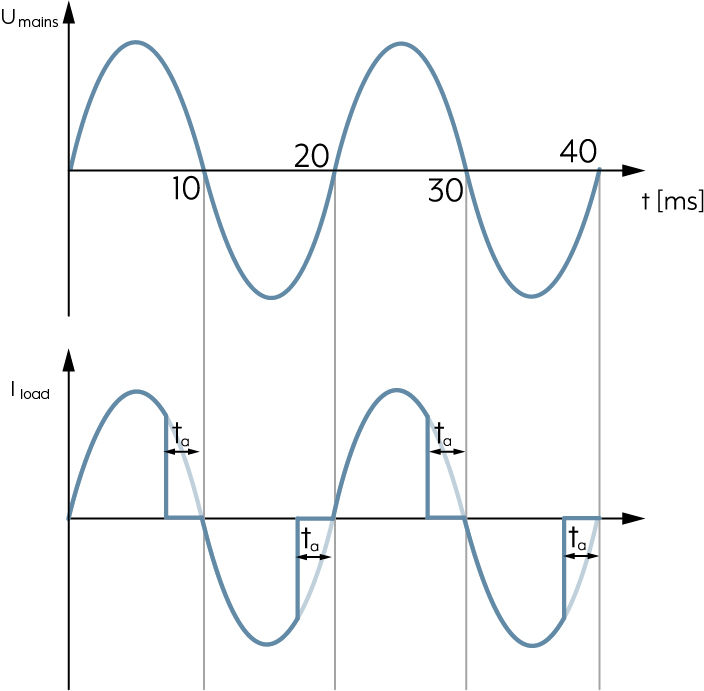
In the case of the trailing edge phase control principle, the lamps are switched on in the zero transition of the sine half-wave and switched off again after a configurable delay time. The advantage here is that no interference voltage occurs during switching on because the voltage at the time point equals zero. The trailing edge phase control principle is suitable for all incandescent lamps and loads with capacitive input behaviour, e.g. electronic transformers. In addition, there are LED lamps that are only suitable for the trailing edge principle. For example, these are lamps that have a capacitor on the input side (e.g. for radio interference suppression). If this is discharged, it acts like a short-circuit for a short time during the switching on. This effect would produce high current peaks for leading edge phase control due to the steep switch-on edges.
V
Ventilation position
The ventilation position is any position between the upper and lower end positions at which the blind or shutter stops automatically when descending. For example, the room can continue to be ventilated or is not completely darkened. After the blind or shutter has stopped in the ventilation position, it can also be moved down into the lower end position with a new command. In combination with the JUNG HOME push-button cover, the saved blind/shutter positions can be controlled from any position using the JUNG HOME app.
W
Walking test
The walking test allows the detection range to be checked. The walking test is activated with the JUNG HOME app and remains active for 5 minutes. Now you can move across the detection range. Where movements are detected, the status LED lights red, the linked lighting is switched on for approx. one second and there is a message in the JUNG HOME app.
Wind alarm
This application is used for protecting blinds or awnings from storm damage. With an activated wind alarm, the blind/shutter is moved to its upper end position and locked against being moved out again until the wind alarm is ended. The wind alarm can be ended using the JUNG HOME app if required.