Use Case 2 – Presence monitoring with movement detector – Luxury hotel room
Instead of a key card holder, the motion detector mini basic together with a KNX power supply with IP interface takes over the presence detection. The power supply is operated by the communication objects of the KNX push-button interface 4-gang Secure. This can be used to trigger light scenes and operating modes (e.g. air conditioning, underfloor heating, etc.) in hotel rooms, for example:
A. Light scene 1: with 50 % light in the bathroom, 100 % light at the bed; operating mode 1: "Comfort"
B. Light scene 2: "All Off"; operating mode 2: "Eco".
In addition to the hotel room, further applications are also possible in offices, conference rooms, public washrooms as well as corridors and passages.
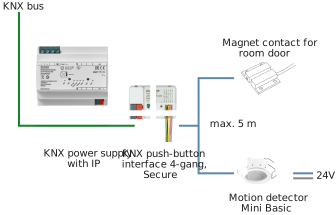
Required components
Components | See also |
|---|---|
JUNG KNX power supply with IP interface, 320 mA | |
JUNG KNX push-button interface 4-gang, Secure | |
JUNG motion detector mini basic | |
JUNG magnet contact |
When a person enters the room for the first time (First Entry - door contact is activated), a "Welcome" scene is triggered. The lighting is switched on dimmed (additional dimming actuator required).
If the presence detector detects presence within the activation time, the "Comfort" operating mode is activated, the blind is moved to its upper end position (this requires an additional blinds actuator) and additional lighting is dimmed.
A different scene is also triggered if the presence detector does not detect presence within the activation time: the lighting is switched off ("All Off").
A "Night Light" scene is triggered when another person enters the room (door contact is activated again): the entrance lighting is dimmed to minimum brightness.
If a person leaves the room and no more presence is detected after a delay time, an operating mode is transmitted. The operating mode "Standby" can be activated in this way, for example. A "Goodbye" scene is triggered after the activation time, thus switching off the lighting.
Activation trigger 1 (e.g. door contact or switch) by | change to "On" |
Number of presence detectors (all presence detectors are OR linked) | 3 |
"Welcome" scene before detection of presence | √ |
Activation time "Welcome" (s) | 30 |
Output value (scene) "Welcome" | 1 |
Output value (scene) if presence mode is not activated during that time (no presence detected) | 2 |
"Presence" scene after detection of presence | √ |
Output value (scene) "Presence" | 3 |
Switching operating mode room controller after detection of presence | √ |
Output value (operating mode) | "Comfort" mode (1) |
PRESENCE MODE |
|
The presence mode describes the state when a door contact is detected, although there is presence in the room. |
|
If trigger 1 is activated again and no presence is detected within a configurable time period, the lighting is deactivated and the room controller switches to "Comfort" or "Standby" mode. |
|
If a presence is detected, "Goodbye" will be aborted. Trigger 1 must be activated again to start the "Goodbye" loop again. |
|
Scene after trigger 1 is activated again, if trigger 2 is already active | √ |
Output value (scene) | 4 |
"Goodbye" scene when trigger 1 is activated again and no presence is detected | √ |
Run-on time for trigger 2 before "Goodbye" scene is started (s) | 240 |
Output value (scene) "Goodbye" | 5 |
Switching operating mode room controller "Goodbye" | √ |
Output value (operating mode) | "Standby" mode (2) |