Glossary
0
0.5 – 5 hours Continuous OFF function
Timer function where the load remains switched off for a configurable period of 0.5 to 5 hours and then automatically returns to automatic operation.
0.5 – 5 hours continuous ON function
A time-limited continuous operation where the lighting remains switched on for a fixed period of time between 0.5 and 5 hours.
A
Access control
RFID-based access system on doors, often part of the card system and DND/MUR workflows.
Activity colour
The colour of the lens on the key card holder/room operating element that blinks or lights up during a specific activity (e.g. run-on time after the card is removed) and thus makes the status apparent for guest and employee.
Adapter frame
Intermediate frame that enables the integration of inserts or centre plates in other switch ranges or existing recesses – important for renovations or mixed installations.
Air-conditioning mode
Modes such as Comfort, ECO, Night, Frost protection or Away which automatically adapt the temperature. Alternatively also air-conditioning function.
Alarm operation function
An operating mode for increasing the security in unused or locked areas. As soon as an unexpected movement is detected during the active phase, the lighting automatically switches on.
API
A programming interface (also application interface - a detailed interface for programming applications), often just named API (application programming interface), is a part of the program provided by a software system for other programs to interact with it. The JUNG OpenAPI is the interface for hotel apps. They can control the hotel environment with JUNG OpenAPI without having to access the JUNG SV-Server app.
Application examples
Concrete example installations from the workbook (e.g. economy, midscale, luxury) which show how the components can be combined in a typical hotel project.
Astro timer
The astro timer is one of the many functions of the JUNG HOME devices. It enables connected devices to switch on or off at sunrise and sunset times, or defined times relative to these events. The astro timer offers various setting possibilities. In the factory setting, the astro timer is deactivated. The time shift is one of the other setting possibilities for the astro timer. With this function, the switching time of the loads can be shifted by a specified value. For example, it can be set up so that the garden lighting will be switched off at 21:00 at the latest, even if sunset is not until 22:00. The astro timer is based on the geographical location of the project. In order to be able to correctly calculate the sunrise and sunset times, the geographical location must be specified in the JUNG HOME devices. The calculation is made once a week.
Astro timer threshold
The astro timer threshold is used to limit the time range of the astro timer to an earliest and/or latest execution time. The threshold is independent of the sun position times (sunrise and sunset). For example, if the sun rises in the summer at 5 am, but I don't want the shutter or the blind to open before 7 am
Astro timer time shift
The astro timer time shift is a function integrated into the JUNG HOME devices. It enables on and off switching times for the load to be shifted by a personally selected time (in minutes). If there is a need to run the time program in the morning before dawn or only when it is completely bright, this can be implemented using the "sunrise" shift. If there is a need to run the time program in the evening before twilight or only when it is completely dark, this can be implemented using the "sunset" shift. This offers the user flexibility to adjust the time range. The time shift can be set in the application and adapted as required
Automatic function
Operating mode where, for example, a movement or presence detector switches the light on and off independently dependent on movement and brightness without manual operation.
Automatic light
Lighting that does not use classic switches but is triggered and automatically switched off using sensors (movement/presence, brightness) in order to increase convenience and energy efficiency.
Automatic shading control
Automatic or manual movement of blinds, shutters or curtains for glare and heat protection, ideally dependent on the position of the sun, brightness and room status.
Automatic switch
Combination of motion sensor and switching device in one component, which automatically controls the lighting after movement detection and a set run-on time (from JUNG among others as wall insert).
B
Backlight
LED backlight for operating elements or displays for better readability or for status signals (e.g. DND/MUR).
Basic lighting
General, even room lighting (e.g. ceiling lighting), often the basis for light scene control in the hotel room.
Behaviour after mains voltage return
The "behaviour after voltage return" parameter refers to the behaviour of the JUNG HOME devices after a power failure and the subsequent return of mains voltage. Note: do not use the "Switched on" setting in combination with electrical loads that can lead to physical danger or to property damage. If the parameter is set to the factory setting, the load output of the JUNG HOME SCHUKO® socket after the voltage return will be switched off, for example. That means, the connected devices will initially not be provided with power. All settings made and time programs set up for the JUNG HOME device are retained. However, missed switching times are not executed, which means that the planned switching operations during the power failure are not carried out. It is important to note that this behaviour only occurs if previously the JUNG HOME device was not yet added to a Bluetooth® MESH network using the JUNG HOME app. In this case, the JUNG HOME device will go into pairing mode for 2 minutes after the voltage return and the status-LED will slowly blink blue continuously. By setting the "behaviour after voltage return" parameter, therefore, the behaviour of the JUNG HOME device after a power failure can be individually adapted.
Bell function
Doorbell in the hallway or room triggered with the corridor unit or a push-button, often combined with a pilot light.
Brightness sensor
Sensor for measuring the ambient brightness.
Brightness threshold
The brightness threshold is a value below which the load is switched on when a movement is detected. In "Daytime operation" setting, the device reacts to every movement of brightness-independent.
Brightness value
Value that specifies the brightness that a lamp is set to when it is switched on.
Building automation technology
Integration and automation of functions such as light, air conditioning, shading, energy and access via systems such as KNX or Visu Pro in order to optimise operating costs, convenience and energy.
Building automation technology
Umbrella term for all technical functions, which can be controlled centrally or decentralised. These include light, air conditioning, heating, shading and security.
Building protection
Sensors and automation functions that protect the building from damage (e.g. frost protection, water sensors, sun protection, access control).
Building technology
All technical installations in a building, from the power supply and network to HVAC and lighting technology - the basis of hotel automation solutions.
C
Card reader
Access or room control devices, which allow the guest to enter the room by showing a card.
Ceiling observer operating mode
An operating mode where switching of a load is fully automated and happens dependent on detected movement and ambient brightness. In this operating mode, no option for manual switching off is provided.
Clever Config app
Bluetooth® app from JUNG with which among others movement and presence detectors can be conveniently configured (operating mode, run-on time, brightness threshold, special functions).
Colour printing
Individual printing of glass covers or rocker switches in colour, e.g. with pictograms, hotel branding or text, to clearly identify functions.
Colour temperature
The colour temperature is a measure for a qualitative description of the impression of the colour of a light source. Standard lamps have colour temperatures between 2,500 Kelvin (warm white) and 5,500 Kelvin (daylight white).
Comfort mode
Mode for maximum comfort: optimum temperature, full lighting, all sockets active. The mode is mostly used for occupied rooms.
Consequential damage
Damage that is incurred as the result of a technical defect, e.g. water damage after a pipe leak or frost, is reduced by early status monitoring with KNX sensors.
Constant light regulation function
A control function dependent on light that ensures a constant light brightness level in the room with the help of a dimming insert. A pre-defined setpoint is maintained through continuous measurement of the overall brightness level from artificial and natural light. The regulation happens automatically when presence is detected and leads to a constant lighting and higher energy efficiency.
Continuous OFF function
A mode where the automatic switching on is prevented permanently. The load remains switched off independent of any detected movement until the function is manually deactivated again.
Continuous ON function
A function with which the automatic switching off by a motion detector is temporarily deactivated. The lighting remains permanently switched even when no movement is detected.
Continuous operation
Operating mode with which a function - usually light or heating - remains permanently switched on, independent of motion detection or time control, e.g. for special operating times.
Control software
Software such as Visu Pro, hotel software or Config-Tools that configures, controls or visualises.
Cooling
Operating mode where the room is cooled. The controller controls the cooling circuit according to the selected setpoint temperature.
Cooling function
Sub-function of the RL control unit or KNX thermostat for temperature regulation incl. modes such as Comfort, ECO, Frost protection or Night setback.
Corridor unit
Corridor units give a clear display of the wishes of the guest, which have been set previously in the room unit. The employees thus see immediately whether the guest does not want to be disturbed or wants the room to be cleaned. At the same time, the integrated doorbell function prevents the guest being disturbed unexpectedly
D
Daytime operation
Time profiles that activate various lighting or air conditioning functions. In daytime operation, for example, lights can be switched off or blinds raised.
Decentralised room automation
Concept where the control of light, air conditioning or shading happens directly in the room (e.g. in the room controller or actuator in the splitter) instead of with a central system, which increases flexibility.
Detection range
The area/field within which a JUNG motion detector or JUNG presence detector detects movements and as a result calls scenes or switches lights on or off. With the help of satellite units and other JUNG motion detectors or JUNG presence detectors, a detection range can be extended.
Dimming insert
System insert which controls the brightness of luminaires and can be combined with different operating covers (push-buttons, motion detectors, presence detectors). The basis for scenes and constant light.
Dimming method
Technical method for how a dimmer controls the load (e.g. leading edge phase control or trailing edge phase control); the appropriate dimming method is chosen based on the type of lamp.
Disabling function (forced guidance)
The disabling function with forced guidance is a parameter available in JUNG HOME devices. This function enables the initial state of the JUNG HOME device to be specified and to protect this against changes by motion sensors, satellite insert operation, time programs, the app or other JUNG HOME devices. There are various setting possibilities for the disabling function: 1. Deactivated: in this mode, the disabling function is switched off and the JUNG HOME device can be operated normally. 2. Continuous ON/continuous OFF: in this mode, the load output is switched to the desired state (on or off) and remains fixed in this state. 3. ON/OFF for fixed time: for this a certain time can be set during which the disabling function is to be active. During this time, the state of the JUNG HOME device remains unchanged. The factory setting of the disabling function is "deactivated", which means that the JUNG HOME device can be normally controlled as standard. It is important to note that the disabling function should be used with forced guidance in order to prevent potential dangers for people or damage to devices. It can be useful, for example, to ensure that certain devices have to always remain switched on or to prevent accidental changes to the device state. The settings for the disabling function can be made in the app or using other control methods, depending on which options are available for the JUNG HOME device.
Do not disturb
Status message ("Do not disturb") indicating that the guest does not want any cleaners, room service or maintenance staff visiting, is selected on the room unit/hotel display and transferred to the corridor unit and KNX visualisation where installed.
E
Eco mode
Energy-saving operating mode of room thermostats, where the setpoint temperature is lowered and the display dimmed to save energy and to not disturb the sleep of the guest.
Efficient time management
The high-level advantage of the linked building technology: status and service information (e.g. housekeeping, maintenance) are available digitally and enable optimised work processes.
Elbow-operated switches
Oversized push-button that can be operated with the elbow or lower arm, designed for areas where hands are not free or there are hygiene issues (e.g. kitchen, care areas).
Employee card
Card for housekeeping or maintenance employees which activates special rights such as cleaning mode.
Encrypted wireless communication
Type of communication in the Bluetooth® MESH network protocol with which the data are protected from access by third parties and transmitted confidentially due to their encryption.
Energy consumption
Electrical energy required by the lighting, air conditioning, entertainment and other electrical loads in the hotel. The energy can be systematically reduced with automations.
Energy efficiency
The relationship between the energy used and the comfort produced (light, shading, heating, cooling). The relationship is optimised in the system using sensors, scenes, eco-profiles and switching off loads during absence.
Energy management
The total of all functions for monitoring and control of energy consumers in a building (e.g. load management, PV use, switching off after check-out).
Energy self-sufficiency
Target state where a building covers its own electricity requirement (e.g. PV systems with storage), supported by the integration of energy management and building technology.
ETS product family
All JUNG components that can be configured with the KNX software ETS (Engineering Tool Software). These include among others push-button sensors, actuators and presence detectors.
ETS Service app
A mobile addition to ETS with which the KNX devices on-site can be more easily tested, addressed or maintained – practical for commissioning and servicing in hotel projects.
F
Façade protection
Protection of building facades with integrated sensors (e.g. weather station) and shading control, which minimise damage caused by wind, sun or rain.
Fan coil unit
Air conditioner device with fan that can heat or cool; can be controlled with the JUNG room controller or KNX actuators, incl. operating modes and temperature setting.
Flush-mounted box
Installation boxes for device installations where the box is plastered in.
Frost protection
Measures to prevent freezing of buildings and heating systems. The frost protection is ensured by a minimum temperature. The heating is kept at this minimum temperature in order to prevent frost damage.
G
Glass cover
High-quality glass front for operating elements or displays with scratchproof surface and elegant look, e.g. for fan coil units or hotel displays.
Goodbye function
Function activated on leaving the room (e.g. by removing the key card). All electrical loads are switched off, the air conditioning set to ECO and window contacts taken into account.
Guest card
Chip card given to guests enabling functions such as room access and activation of the key card holder for convenience and energy automation.
H
Heat movements
The basis of PIR detection: temperature changes in the detection range.
Heating
Operating mode where the room is heated. The controller controls the heating circuit according to the selected setpoint temperature.
Heating control
Automatic temperature control of the hotel room, dependent on presence, window contacts and operating mode, with JUNG room controller or KNX controller.
Heating function
Sub-function of the RL control unit or KNX thermostat for temperature regulation incl. modes such as Comfort, ECO, Frost protection or Night setback.
Hollow wall box
Flush-mounting box for installing devices in drywalls.
Hotel display
To simplify the direct communication between guest and housekeeping, JUNG offers the hotel display. "Do not disturb" or "Make up room": the corresponding lit LED indicates the wish of the guests in the corridor.
Hotel light / orientation light function
A function which enables a two-stage lighting with the help of a dimming insert. A low brightness value serves as a permanent orientation light, in corridors and stairways, for example. When movement is detected, the light is switched to a previously defined, higher brightness value. After expiry of the run-on time, the lighting returns to the orientation level.
Hotel mode
Operating mode of the thermostat or control unit, especially for the hotel profile: the hotel mode includes the 5 profiles Comfort, Comfort-, Eco, Standby and Building protection. The KNX room thermostat fan coil can, as well as the hotel mode, also be switched to KNX mode and then includes 4 operating modes: Comfort, Standby, Night and Frost protection.
Housekeeping
Hotel cleaning and service logistics that are digitally supported using corridor units, room units or Visu Pro (e.g. room status, MUR, cleaning complete).
I
Information lighting
LED signals that inform guests, for example, about room status, orientation light or safety instructions.
Infrastructure wiring
Structured cable routing for energy, network and KNX; basis for the secure function of access systems and room door automations.
Interference sources
Influences such as heat sources, reflections or ventilation which can affect the detection by the sensors.
IP44
Degree of protection against spraying water, suitable for bathrooms, corridors or outside areas.
J
JUNG Quick Charge
USB sockets from JUNG with 18 W quick charge function for mobile devices.
JUNG switch design
Design ranges from JUNG (A range, LS range, F50 etc.) that combine function inserts with matched look and materials.
JUNG Visu Pro (hotel)
Visualisation and management solution for managing room status, scenes, energy consumption, housekeeping and service processes.
K
Key card configurator
Software for setting up key cards (RFID), e.g. for the parameters colour for stand-by, confirmation signal, presence brightness and run-on time.
Key card holder
The key card holder is used to store the key card and guarantees a high level of security and energy efficiency, as any electrical loads still turned on are switched off automatically when the key card is removed.
Keycard
RFID or magnetic card for access control or room activation.
KNX
With a KNX bus system, components such as light, shading or the heating can be linked intelligently with each other and controlled centrally or automatically.
KNX Data Secure
Security mechanism that protects KNX communication against manipulation and unauthorised access.
KNX IP Secure
Security mechanism that protects KNX communication against manipulation and unauthorised access.
L
Labelling
Individual inscription of glass covers or rockers, e.g. with pictograms, logos or text.
Laser engraving
Individual inscription of glass covers or rockers, e.g. with pictograms, logos or text.
Leading edge phase control
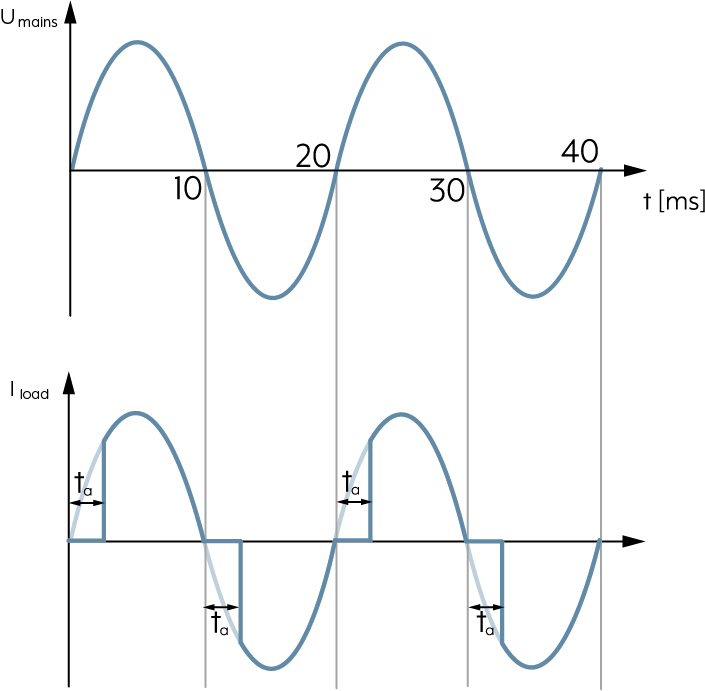
In the case of the leading edge phase control principle, the dimmer blocks the current to the lamp at the beginning of every sine half-wave. It is not conductive. The electronic switch in the dimmer is not switched through until after expiry of a configurable delay time and the connected lamps are energised. The current is removed with the next sine zero point and the lamp is switched off. This process is repeated in every sine half-wave, i.e. 100 times per second. The brightness of the connected lamps can be continuously adjusted using the delay time. The leading edge principle is suitable for ohmic and inductive loads, incandescent lamps or extra-low voltage halogen lamps with conventional (wound) transformer. There are also specially approved LED lamps for dimming according to the leading edge phase control principle.
LED floor pilot light
Automated light dimmed low for orientation in corridors or bathroom that is often controlled by sensor.
LED pilot light
Status LEDs that signal whether a room can be entered or service is needed. There are the indicator lights "traffic-light function" and "Note".
Lens colour
Colour of the side lens on key card holders which identifies status or activity.
Lighting control
The targeted switching, dimming and scene control of light sources in a hotel – manually, time controlled or supported by sensors, often together with KNX or LB Management.
Lighting requirements
Description of which light quality and quantity is needed in an area (e.g. safety in a corridor, work light in the bathroom, atmospheric light in the room) – the basis for scenes and sensors.
Locking time
If a movement detector has switched off the lighting, the movement detection is suppressed for a short locking time in order to prevent the movement detector recognising the cooling down lamps in the monitoring area as thermal movement and switching on again immediately. The required locking time is determined automatically by all movement detectors and is 0.3 to max. 3 seconds.
M
Main lighting
The central, brightest light source in the room, which provides sufficient general brightness and is frequently dimmable.
Make up room (MUR)
Request to housekeeping using the room unit and transmitted to the corridor unit/Visu Pro.
Manual switching off during run-on time
The "manual switching off during run-on time" parameter refers to the JUNG HOME devices. This function specifies whether it is possible to manually switch off the connected load during the run-on time. The run-on time refers to the period of time during which the JUNG HOME device remains active after switching on before it is automatically switched off. When the "manual switching off during run-on time" parameter is set to "on", the load can be switched off manually during the run-on time. This means that a person can operate the device (e.g. the JUNG HOME SCHUKO® socket) to switch off the connected load, e.g. light, before the run-on time has expired. When the parameter is set to "off", manual switching off during the run-on time is deactivated. This prevents a second person from switching off a connected load such as a light early before the run-on time has expired. Note: with an automatic stairway lighting controlled by JUNG HOME operating and/or sensor covers, this parameter should be set to "off" so that the light cannot be switched off by a second person.
Measurement process
Initial configuration of sensors and regulators (e.g. detection range test, brightness adjustment, temperature calibration), so that the devices work optimally in the respective room.
Minimum brightness
Lower dimming value under which the lighting may not be dimmed - important for flicker-free light.
Minimum motor reversal time
To prevent overvoltage occurring that could damage the system insert or motor when the running direction is reversed while it is moving up or down, there is a pause in movement of approx. one second between the switching off and switching back on of the motor.
Minimum switching repeat time
The minimum switching repeat time is a parameter that can be set for JUNG HOME devices. It specifies the minimum time that has to lie between two sequential switching processes of JUNG HOME devices. This parameter is useful to adjust the switching speed of the device and to avoid damaging the connected load. By increasing the value of the minimum switching repeat time, the switching speed is reduced, which means the JUNG HOME device is not switched on and off too quickly. This can be helpful, for example, to avoid overloading the connected devices or to reduce disruptive switching for certain applications. It is important to note that the last command lying within the switching repeat time will be executed with a delay. The switching repeat time starts from the beginning after each switching operation. The factory setting for the minimum switching repeat time is normally 100 ms, but it can be lengthened within the range of 100 ms to 10 s.
Modular system
Modular system of inserts, covers and design frames with which different functions (e.g. switching, dimming, KNX) are combined with various design ranges.
Motion detection
The motion detection with the JUNG presence detectors uses three independent passive infra-red sensors. The sensitivity of the sensors can be adjusted separately.
Motion detectors and ceiling observers
Motion detectors and ceiling observers provide safe and energy-efficient lighting. They activate the lighting automatically as soon as movement is detected, and they are particularly suitable for transitional zones such as stairways or corridors or for night-time orientation lights in social areas.
Mounting time
Design parameters for installation efficiency: can be clearly reduced with insert system or module technology.
N
NC contact
Type of contact in push-buttons, sensors or key card holder. Isolates the electric circuit
Night light function
A function that during a defined time period activates a low brightness level when movement is detected. A dimming insert is required for this.
Night mode
Time profiles that activate various lighting or air conditioning functions. In night operation, for example, lights can be switched on or blinds can be closed.
Nightlight scene
Softly dimmed light scene for night-time movements in the room, which is activated by sensors or push-buttons.
NO contact
Type of contact in push-buttons, sensors or key card holder. Connects the electric circuit.
O
Observers
Operating mode in which the JUNG HOME motion detector can be used. If the observer detects a presence and the brightness threshold is not reached, all actuators connected to it are switched on. In observer mode, lighting that has been switched on cannot be manually switched off.
Occupancy status
Information about whether a room is occupied, empty or already cleaned. The status is visualised at reception, for example via KNX and JUNG Visu Pro and updated with messages from housekeeping.
Operating concept (rocker, push-button, scene)
With the operating concept, the function and button allocation of the JUNG HOME push-button can be tailored.
Operating controls
All visible parts with which the guest or employee triggers functions: push-buttons, rockers, touch surfaces, rotary controls or displays for room controllers and door stations.
Operating lock
The operating lock is a function integrated in the JUNG HOME devices. It enables local operation of the JUNG HOME device to be locked so that it can only be operated using the app. This function can be useful to prevent unauthorised use of the JUNG HOME device, for example in public areas or to protect children from accidentally switching devices on or off. The operating lock can be deactivated with the app at any time. This allows local operation of the JUNG HOME device to be enabled.
Operating mode
Configured mode of a device (e.g. "ceiling observer", presence detection", "continuous ON") which defines how sensors react to movement and brightness and how the load is switched.
Operating options
The totality of the possibilities for operating the system: locally at a push-button, using a key card holder, app, touch panel or using automatic functions.
P
Passive infra-red sensors
Passive infra-red sensors are used in JUNG motion detectors to remotely detect and evaluate thermal radiation from people (and also animals). In this way, connected luminaires are automatically switched on and off.
Pilot lamp
Small LED in the push-button that indicates whether a function is active or where the push-button is located.
Pilot light
Permanent, low brightness basic light providing orientation in corridors or bathrooms, often combined with presence control. Alternative term: orientation light.
Plastering frame
Accessory integrated into the plaster layer for LS ZERO and enables a flush mounting of inserts and frames. This is important for flush designs and a clean installation situation.
p
plug + go
Interface for controlling dimmable luminaires via DALI combined with power supply.
P
Plug-in installation modules
Pre-assembled modules that greatly reduce installation time (plug + go system).
Power-DALI
Interface for controlling dimmable luminaires via DALI combined with power supply.
Presence detection operating mode
An operating mode where switching a load happens automatically based on movements detected and the existing ambient brightness. In this operating mode, manual switching on and off is also possible.
Presence detector
Presence detectors are motion detectors that are typically installed in rooms where a person is present for longer periods of time. The primary goal of the presence detector is to save energy and to switch off or dim the room lighting when no person is present. The presence detector must also be able to recognise small and sporadic movements for this. In this application, the light must also be able to be switched off manually. Presence detectors can be switched off as required and then ignore movements in the detection range. Presence detectors measure the ambient brightness and thus make automatic lighting control even more intelligent: they can be configured such that the lighting is only switched on when movement is detected when additionally the brightness is below a set brightness (brightness threshold). The presence detector can be used as a ceiling observer. If the ceiling observer detects presence, it can, for example, switch a camera or an alarm loud (acoustic signal) or silent (visual signal).
Presence mode
Mode and sensors for recognising slight movements for light and climate controlled automations. Alternatively also presence detection.
Presence monitoring
Use of presence or motion detectors to detect if people are in the room. The presence monitoring forms a basis for automatic light, air conditioning or safety functions in hotel areas.
Puck
The JUNG HOME Pucks enable simple and budget-conscious extension of the electrical installation. The Pucks switch and dim lighting, move blinds, shutters and awnings, control cooling and heating applications, measure energy use or switch electrical loads. Every Puck has two, separately usable, binary inputs. Furthermore, the portfolio gets a battery-operated Puck, that offers further application possibilities, such as polling window contacts. The low height simplifies installation in flush-mounted and electronics boxes, cavity wall boxes behind push-buttons, baldachins, false ceilings, roller shutter housings or in the distribution box.
Pulse insert
Insert that creates switching pulses, e.g. for staircase light timers or pulse operation with motion detectors.
Pulse operation function
A mode where the load is only switched on briefly for one pulse when movement is detected. If the movement continues, further pulses are triggered at regular time intervals. This operating mode is suitable for rooms with irregular use where only brief lighting is sufficient.
Push-button
A device of the electrical installation with an operating element that is actuated by pressing and then returns to the starting position. The electrical contact is only closed for the duration of the actuation. An example for this is the actuation of a bell button. The doorbell can be heard while the bell button is kept pressed. As soon as the bell button is released, the doorbell can also no longer be heard.
R
Radial movement direction
Movement direction that is towards a motion detector or presence detector in a straight line. With radial movements, the detection range is smaller than with tangential movements.
Real glass cover
Centre plate in glass instead of plastic for room controllers or operating elements that offers a particularly high-quality, scratch-proof surface and a high-class look, e.g. for fan coil controllers.
Red/green function
LED pilot light which can be switched in three colours, (red/yellow/green), e.g. for access display "vacant/occupied" on doors or in meeting rooms.
RFID key card holder
The RFID key card holder is used to store the key card and guarantees a high level of security and energy efficiency, as any electrical loads still turned on are switched off when the key card is removed, with an adjustable delay. The RFID key card holder is completed with the energy saving unit. A customer-specific adaptation of the optical fibre colour and brightness and switch-off delay of the second relay is possible before ordering. Please visit the following web site for a customer-specific adaptation of the key card holder: jung.group/hotelcard
Rocker function
Operating mode of a switch or push-button. The user presses on the switch at the top or bottom to change the rocker. In this way, a state changes (light on/off; shading up/down).
Room air control
Automatic regulation of temperature, ventilation and possibly humidity in the room.
Room control
Comprehensive room automation (light, air conditioning, shading, scene) in the hotel room.
Room thermostats
Devices for temperature regulation, often with additional functions such as fan levels, operating modes and time profiles.
Room unit
With the room unit, the guest can select which status will be displayed to the hotel employees on the corridor unit. The options for the guest are whether their room should be cleaned or they currently do not want to be disturbed.
Rotary movement
Movement direction where people move in curves in the detection range – relevant for sensors as various movement directions (radial/tangential) are differently well detected.
Run-on time
The run-on time ensures that the load does not permanently remain switched on after a switch on command but is switched off at the end of the run-on time.
Run-on time (load)
The "run-on time (load)" parameter refers to the JUNG HOME devices and describes the setting for automatically switching off the connected load (e.g. lighting) after a particular time when it is switched on. With this parameter, the run-on time can be adapted to the load to save energy and increase convenience. For example, it can be set so that the lighting is automatically switched off after a specified time if it is no longer needed. This can be particularly useful to save energy if someone forgets to switch off the lighting.
S
Satellite unit
The satellite insert 3-wire provides you with many different functions depending on insert and cover on the main unit. In total, the satellite unit has exactly as many functions as those of the cover placed on the main unit.
Savings potential
Potential for energy and cost saving arising from lighting, intelligent air-conditioning and automated profiles according to need – a central argument for the system.
Set location
"Set location" refers to the function by which the user specifies the current location of their JUNG HOME devices. By setting the location, the device or the application can receive more accurate information about the geographical location. This is particularly useful for receiving location-specific services such as sunrise and sunset times, weather information and much more. For geolocation, the user can either manually enter their coordinates or their address, or use the automatic location detection using GPS data, WLAN signals or mobile phone masts. The JUNG HOME app always calls up the geographical location data of the mobile device to enable the location services (such as the astro timer for sunrise and sunset times). The calculation of the astro timer for the localised position is carried out once a week. Data protection notice: it is important to consider that setting the location can influence the privacy of the user, as the location may be recorded and used by the application or the device.
Setting parameters
All freely configurable values of a device, e.g. run-on time, brightness threshold, sensor sensitivity, dimming curve or operating mode, which are set using an app, ETS or buttons on the device.
Short-circuit protection
Electronic protection from overload or short-circuit in dimmers or switch inserts.
Single-area operation
An operating concept whereby all functions are called from a single, clearly structured button/display surface instead of distributing them across multiple separate switches in the room.
Sockets with USB port
Sockets with additional USB charging function. The JUNG SCHUKO® socket with USB and the French/Belgian socket with USB also provide, for example, a USB charging source for charging devices operated by a rechargeable battery.
Soft start
Soft start of luminaires to spare lamps and electronics.
Status indication / Status LED
LED-based display of important states such as DND, MUR, access, heating/cooling or switching state.
Sun protection
Shading systems (blinds, shutters) controlled with air conditioning, sun position, temperature or manually.
Surface-mounted installation
An installation method whereby the device housing sits visibly on the wall, for example in existing structures or damp locations, instead of in a flush-mounting box.
Surface-mounted version
A product version specially intended for surface mounting. This product version always has its own housing and an adapted degree of protection, e.g. for corridors and outside areas.
Switch
A device of the electrical installation with an operating element that is actuated by pressing, turning or tilting. The electrical contact is closed by any actuation and remains in this state until the operating element is actuated again. An example for this is the actuation of a light switch. If this is pressed, a lamp switches on and lights continuously. If the light switch is actuated a second time, the lamp switches off again.
Switch insert
Base module for switches, push-buttons, dimmers, etc. which is functionally extended in each case with suitable centre plates or covers.
Switched Cable Unit
Prepared, plug-in installation module with integrated fuse which enables fast, safe and modular power distribution in hotel rooms or corridors. Ideal for serial installations and renovations.
Switching state
Current status of a load (on/off ), often visualised on displays or LEDs.
Switch-off advance warning function
A convenience function where the automatic switching off of the lighting after expiry of a run-on time is signalled. Depending on the insert type, the early-warning is made by short blinking or slight dimming. People present receive a chance in this way to prevent the switching off by renewed motion detection.
Switch-off delay
The switch-off delay enables the JUNG HOME device to not interrupt the power supply immediately, but remain active for a specific time until it switches off completely. The benefit of the switch-off delay is that it offers time for particular actions or processes that have to be completed before complete switching off of the socket. For example, it can be useful if devices or machines need a certain time to switch off, or when other devices or systems have to react to an interruption in the power supply. By setting a switch-off delay, you can ensure that these processes can be properly completed before the socket switches off the power supply. In this way, potential damage or errors can be prevented and the lifetime of the connected devices can be extended. The duration of the switch-off delay can be set as required. As a rule, it ranges from a few seconds to several minutes. This enables a flexible adaptation to the specific requirements and circumstances of the respective use case.
Switch-off warning
With the switch-off warning, the imminent switching off of the lighting is announced by, for example, dimming or blinking (depending on the system insert). In this way, anyone present can still react before the light switches off completely and switch the lighting back on. Dimming inserts/DALI inserts: the lighting is dimmed to minimum brightness within 30 seconds. If a movement is detected by a linked JUNG HOME sensor cover during the switch-off warning, or it is switched on again with the operation of a satellite unit or linked JUNG HOME operating cover, the run-on time is restarted and the lighting switches back to the switch-on brightness. Switch inserts: blinking three times with a spacing of ten seconds indicates that the lighting is about to be switched off. If a movement is detected by a linked JUNG HOME sensor cover during the switch-off warning, or it is switched on again with the operation of a satellite unit or linked JUNG HOME operating cover, the run-on time is restarted and the lighting stays on.
Switch-on brightness
Brightness level with which a luminaire switches on, or brightness threshold from which the sensor activates the lighting. Can usually be set to suit the room.
Switch-on delay
Time delay between detected movement or operation and the actual switching on of the load; can be used to prevent false triggers or to control processes.
Switch-on delay
The switch-on delay is a parameter that can be set for JUNG HOME devices. It enables a JUNG HOME device to only be activated after a specified time rather than immediately. An example of a switch-on delay could be when you switch on multiple JUNG HOME SCHUKO® sockets with electronic devices with one switching command at the same time. So that not all devices are switched on at the same time, you can set different lengths of switch-on delay for the different JUNG HOME SCHUKO® sockets. For example, 1 second, 2 seconds and 3 seconds. In this way, you specify a time sequence in which the devices are switched on one after the other in order to prevent an overload of the electric circuit. The switch-on delay can be set in the app.
System insert
A system insert is also called a local actuator channel. The loads to be controlled are connected to system inserts. They still provide the power supply for motion detectors, room thermostats and the covers for JUNG HOME push-buttons for communication.
T
Temperature changes
Parameters for sensors (PIR interference source) or control system (heating curve), which indicate temperature changes in the respective detection range.
Time programs
Time programs are a function available for JUNG HOME devices. With time programs, the JUNG HOME device can be switched on and off at specific times. This means that 16 pre-defined times can be set at which the JUNG HOME device is automatically switched on or off without manual intervention being necessary. To set up time programs, the desired times and switching states for the JUNG HOME device can be set in the JUNG HOME app. Multiple time programs can also be created to define different switching times for different days or devices. This function can be very useful to switch on devices at specific times, such as a lamp to simulate an occupied home when nobody is at home. Time programs provide a convenient possibility to automatically control the JUNG HOME device according to a fixed schedule and to optimise energy consumption.
Timer function
Time-controlled switching such as 0.5 – 5 hours continuous ON/OFF or nightlight profile.
Trailing edge phase control
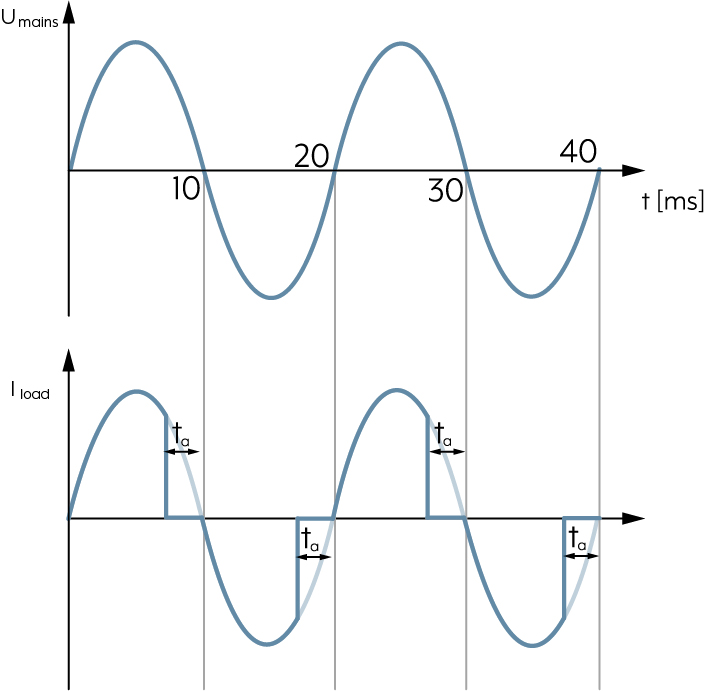
In the case of the trailing edge phase control principle, the lamps are switched on in the zero transition of the sine half-wave and switched off again after a configurable delay time. The advantage here is that no interference voltage occurs during switching on because the voltage at the time point equals zero. The trailing edge phase control principle is suitable for all incandescent lamps and loads with capacitive input behaviour, e.g. electronic transformers. In addition, there are LED lamps that are only suitable for the trailing edge principle. For example, these are lamps that have a capacitor on the input side (e.g. for radio interference suppression). If this is discharged, it acts like a short-circuit for a short time during the switching on. This effect would produce high current peaks for leading edge phase control due to the steep switch-on edges.
U
UV-resistant
Material property, important for external installations. Products that are UV-resistant do not become brittle or change colour when exposed to ultra-violet (UV) radiation.
V
Ventilation position
The ventilation position is any position between the upper and lower end positions at which the blind or shutter stops automatically when descending. For example, the room can continue to be ventilated or is not completely darkened. After the blind or shutter has stopped in the ventilation position, it can also be moved down into the lower end position with a new command. In combination with a cover, the saved blind/shutter positions can be controlled from any position.
Ventilation position
The ventilation position is any position between the upper and lower end positions at which the blind or shutter stops automatically when descending. For example, the room can continue to be ventilated or is not completely darkened. After the blind or shutter has stopped in the ventilation position, it can also be moved down into the lower end position with a new command. In combination with the JUNG HOME push-button cover, the saved blind/shutter positions can be controlled from any position using the JUNG HOME app.
Voltage isolation
Function in the key card holder: electrical loads not needed are switched off when the guest leaves the room.
W
Walking test
The walking test allows the detection range to be checked. The walking test is active for 5 minutes after the start. Now you can move across the detection range. Where movements are detected, the status LED lights red, the linked lighting is switched on for approx. one second.
Water damage
Damage caused by water in hotels. Can be prevented by sensors and automations (e.g. valve locks).
Welcome function / Welcome scene
Function that activates basic lighting, possibly music and the comfort temperature when the room is entered.
Welcome light
Light situation automatically activated when the room is entered (e.g. using the key card holder), including basic lighting and possibly accent lighting for orientation and for a pleasant first impression.