Use Case 1 – Guest room
Instead of a key card holder, the motion detector mini basic together with a KNX multi station takes over the presence detection. This can be used to switch electrical consumers (here lighting) and electrothermal drives (heating or air conditioning). Electrically operated blinds, shutters and awnings can also be triggered.
In addition to the hotel room, further applications are also possible in offices, conference rooms, public washrooms as well as corridors and passages.
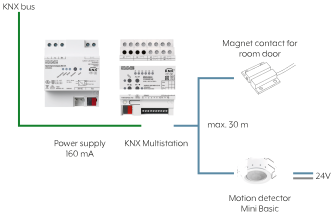
Required components
Components | See also |
|---|---|
JUNG power supply 160 mA | |
JUNG KNX multi station | |
JUNG motion detector mini basic | |
JUNG magnet contact |
If the motion detector mini basic detects the presence of a person, the room is occupied and the connected multi station starts the integrated "Welcome" logic. Various actions are run, such as the regulation of the air conditioning in "Comfort" mode and the activation of a pre-defined light scene.
If no presence is detected, the room is "not occupied" and the connected multi station starts the "Goodbye" logic. This switches the air conditioning system - depending on requirements – to "Standby" or "Eco" operating mode.
Optionally, a delay for switching the lighting on or off can be configured. The lighting control result is not transmitted until the set time has elapsed. If the motion detector mini basic is combined with the KNX multi station, further switching options are available: with the KNX multi station, SCENES, OPERATING MODES and SWITCHING PROCESSES can be triggered.
The lighting control is available as a configuration template for logic functions. Lighting control can be activated as an alternative to the user-defined configuration for logic functions 1 and 2 and enables "Welcome" or "Goodbye" control for lighting in a hotel room etc. There are defined inputs and outputs available.
Functionality
The lighting control distinguishes between the "Welcome" (welcome light) and "Goodbye" (light completely OFF) applications. The parameter "Type of logic function" on the parameters page "Logic functions -> LO... - General" defines the functionality.
Welcome
On entering a room or building, the lighting is selectively switched on, triggered by the 1-bit switching telegram of the BM 360 MBa motion detector, provided it is completely switched off. The polarity of the switching telegram for activation of the lighting (ON, OFF) can be configured. The controller uses the either 8 or 15 lighting inputs to detect whether luminaires are switched on in the room. The "Welcome" function is only executed if all luminaires are switched off (all lighting inputs = "OFF") and the light should be switched on when the room is entered. Ideally, the 1-bit feedback objects of the KNX actuator channels of the lighting to be evaluated are each linked to a lighting input of the controller. The 1-bit result object selected in the result stage is used to switch on the lighting for a "Welcome".
Goodbye
On leaving a room or building, triggered by the 1-bit switching telegram of the BM 360 MB motion detector, the lighting is switched off centrally if it is completely or partially switched on. The polarity of the switching telegram for deactivation of the lighting (ON, OFF) can be configured. The controller uses the either 8 or 15 lighting inputs to detect whether all or individual luminaires are switched on in the room.
The "Goodbye" function is only executed if at least one luminaire is switched on (min. one lighting input = "ON") and the light should be switched off when leaving the room. Also here, ideally, the 1-bit feedback objects of the KNX actuator channels of the lighting to be evaluated are each linked to a lighting input of the controller. The 1-bit result object selected in the result stage is used to switch off the lighting for a "Goodbye".