Installation and settings
Connecting the JUNG HOME SCHUKO® socket and installing
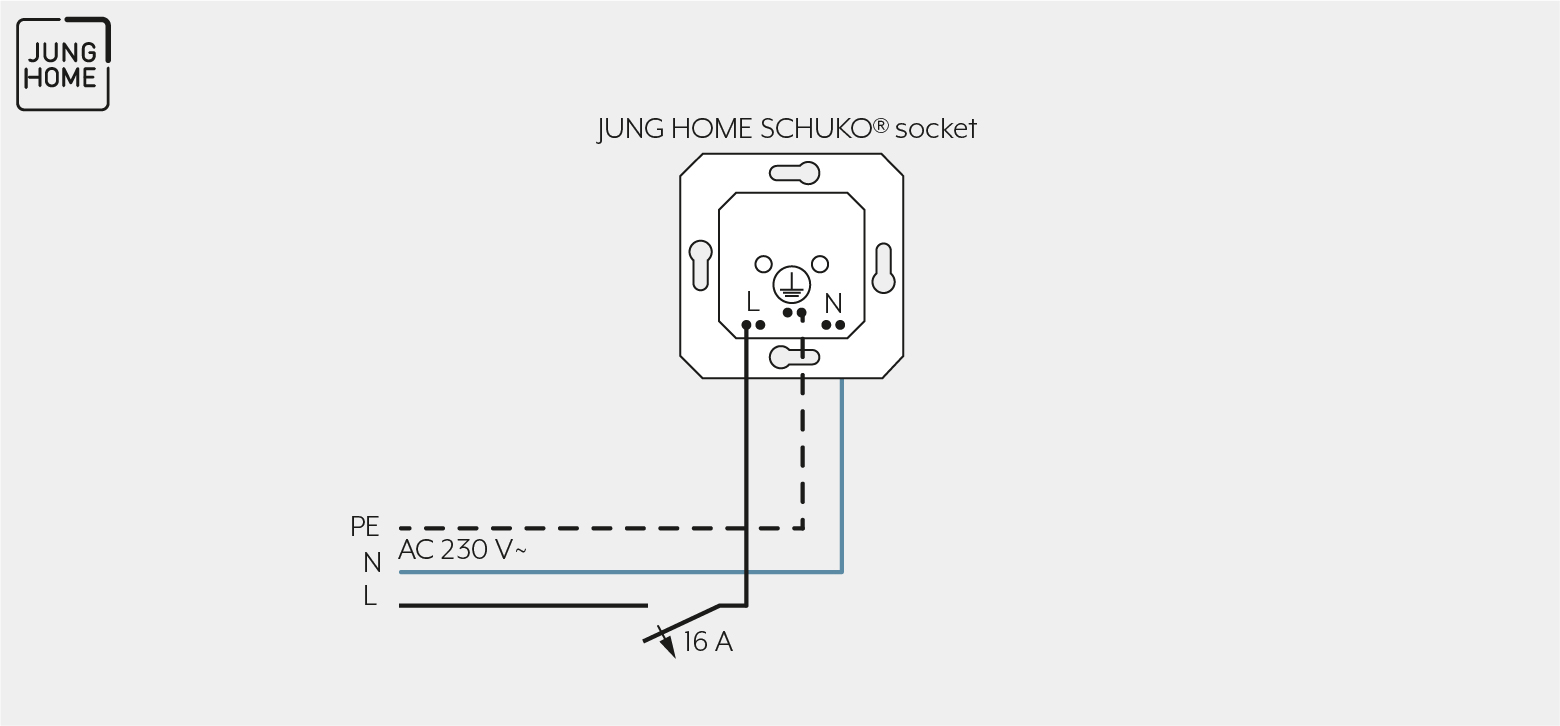
Note the following for the mounting:
Proceed as follows for mounting:
- Connect the JUNG HOME SCHUKO® socket according to the connection diagram.
Note the clampable conductor cross-sections. - Mount the JUNG HOME SCHUKO® socket in the wall box.
Note the mounting depth. - Mount the design frame and the cover.
Ensure correct mounting position. Otherwise, the JUNG HOME SCHUKO® socket will not function correctly.
CLAMPABLE CONDUCTOR CROSS-SECTION | |
|---|---|
| 2 x 1.5 … 2.5 mm² |
| 2 x 1.5 … 2.5 mm² |


Commissioning
For how to commission the JUNG HOME SCHUKO® socket using the JUNG HOME app, see Chapter "Configure JUNG HOME sockets".
LED display in operation | operating mode |
|---|---|
green | Load is switched on |
orange | Load is switched off |
red | Disabling function active, e.g. continuous ON/OFF |
blue blinks three times | Time is not set, e.g. due to lengthy power failure |
blinking green/red | Device is being updated |
red blinks three times | Error message:
|
Once the device has been taught in, the colour for the multi-coloured LED can be selected and configured.