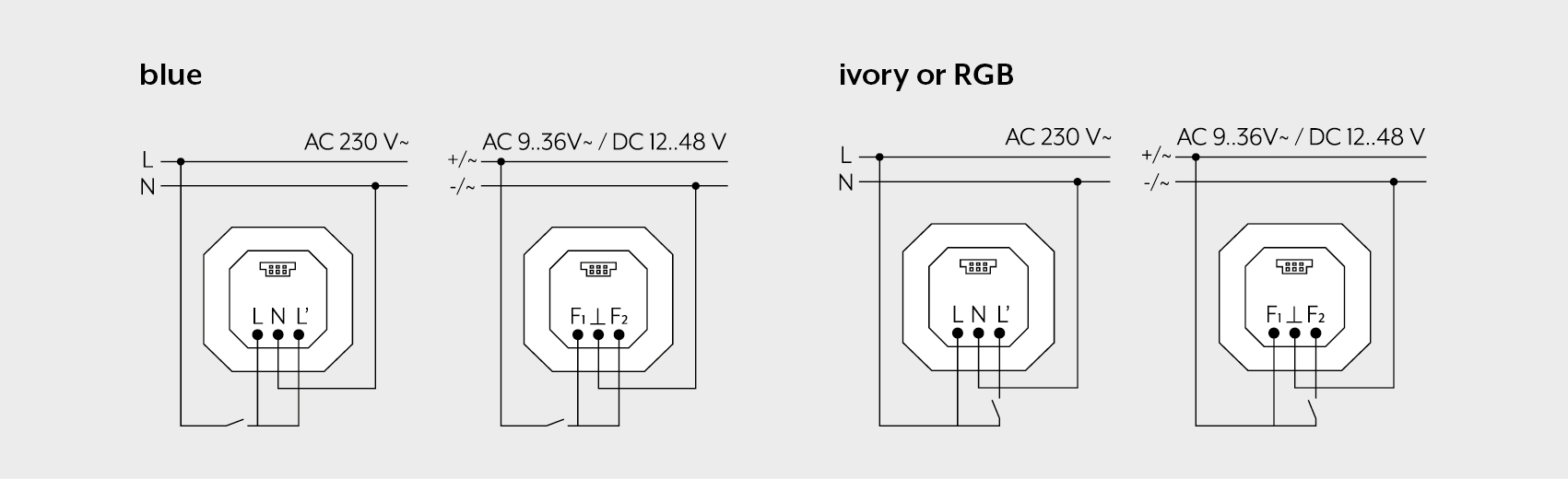
Connect the flush-mounted power supply insert in a deep wall box according to the desired use of the attachment.
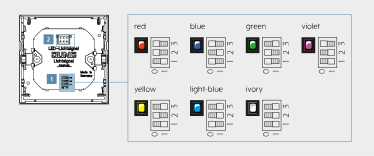
Set the colours on the back of the 3-pole DIP switch (1) for programming the LED pilot light with RGB colours.
The wiring L, L' and N or F₁, F₂ and ⊥ is necessary for programming a traffic light function.
Then set the switches on the back of the 3-pole DIP switch (1) to 1 0 1.
The following traffic light functions can be programmed: only L‘ or F₂ energised red L and L‘ or F₁ and F₂ energised yellow only L or F₁ energised green.
Open the LED pilot light by carefully loosening the connection between the frame and the attachment with a flat blade screwdriver.
Mount the frame on the insert.
Connect the electrical connection of the attachment to the plug (2).
Slide the optional labelling foil into the provided holder.