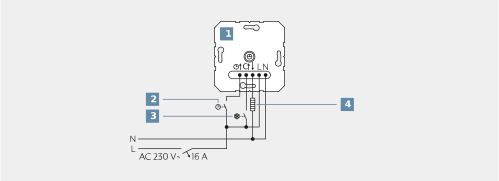
Connect the electric heating device (10) or cooling device to the insert (1) according to the connection diagram. Take note of the conductor cross section. Take suitable building measures when using underfloor heating systems to prevent overheating.
Optionally connect the universal input via a switching contact (8) for a master clock (ECO operation) or connect the switching contact of a presence detector or switch (presence operation). If there are 230 V at the universal input, the setpoint temperature is changed to the ECO temperature for ECO operation and to the comfort temperature for presence operation.
Optionally connect the cooling C input with a switching contact of the heating system (9). If there are 230 V at input C, the cooling is active. If the 230 V supply is switched off, the device switches automatically to heating. After each switchover, the LED lights for 10 seconds in the colour of the current operating mode.
Mount the device in the appliance box. Note that the connection terminals must be positioned at the bottom.
Fit the frame, the centre plate and the operating knob.
Switch on the mains voltage.
The device calibrates itself in the first 90 minutes. Control deviations are possible during this time. Note that during a function check the output can be activated with a delay of up to 30 seconds.