Change the colour of the status LED
The JUNG HOME push-button (… battery-powered) has seven configurable colours and OFF for the status LED. Actuator states can be signalled with this. In additional, with the individual colour setting, a different colour per function can be defined. For example, for the lighting the LED colour can be set to orange for the OFF state and to blue for the ON state. The brightness of the LED can still be changed and the lit duration can be limited to 5 seconds with the night mode.*
Note: with the JUNG HOME push-button 1-gang/ 2-gang battery-powered, the night mode is permanently active.
* available by update
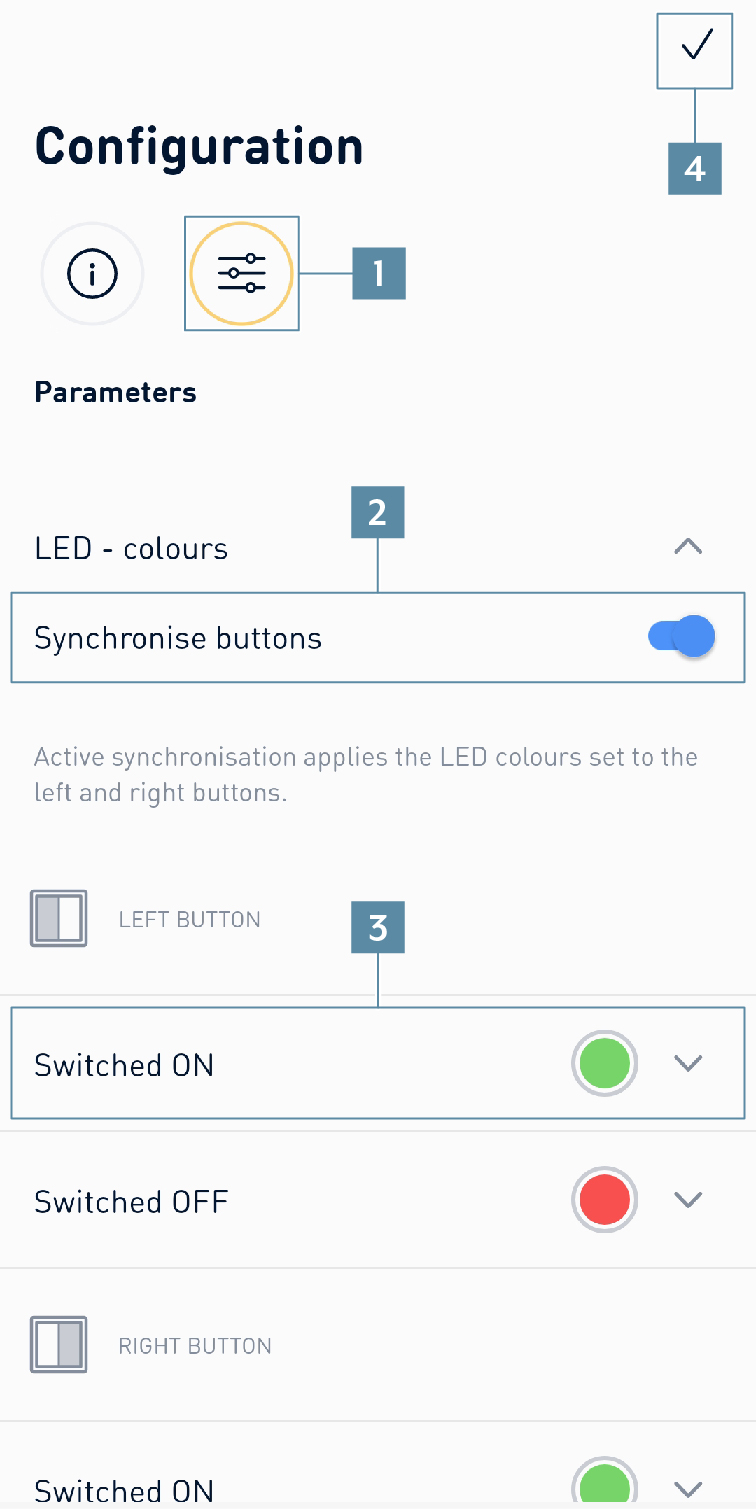
This is how to change the colour and brightness of the status LED:
- Go to the
push-buttonsymbol on thefunction baron theHomescreen. - Select the appropriate push-button.
- Press on the
gearsymbol. - Press on
Parameters(1). - Select
synchronise colours(2) to obtain the same colour setting for both LEDs for the JUNG HOME push-button 2-gang. - Select the desired colour for
switched onandswitched off(3). - Press the
tick(4) to store the settings.