JUNG HOME room thermostat display
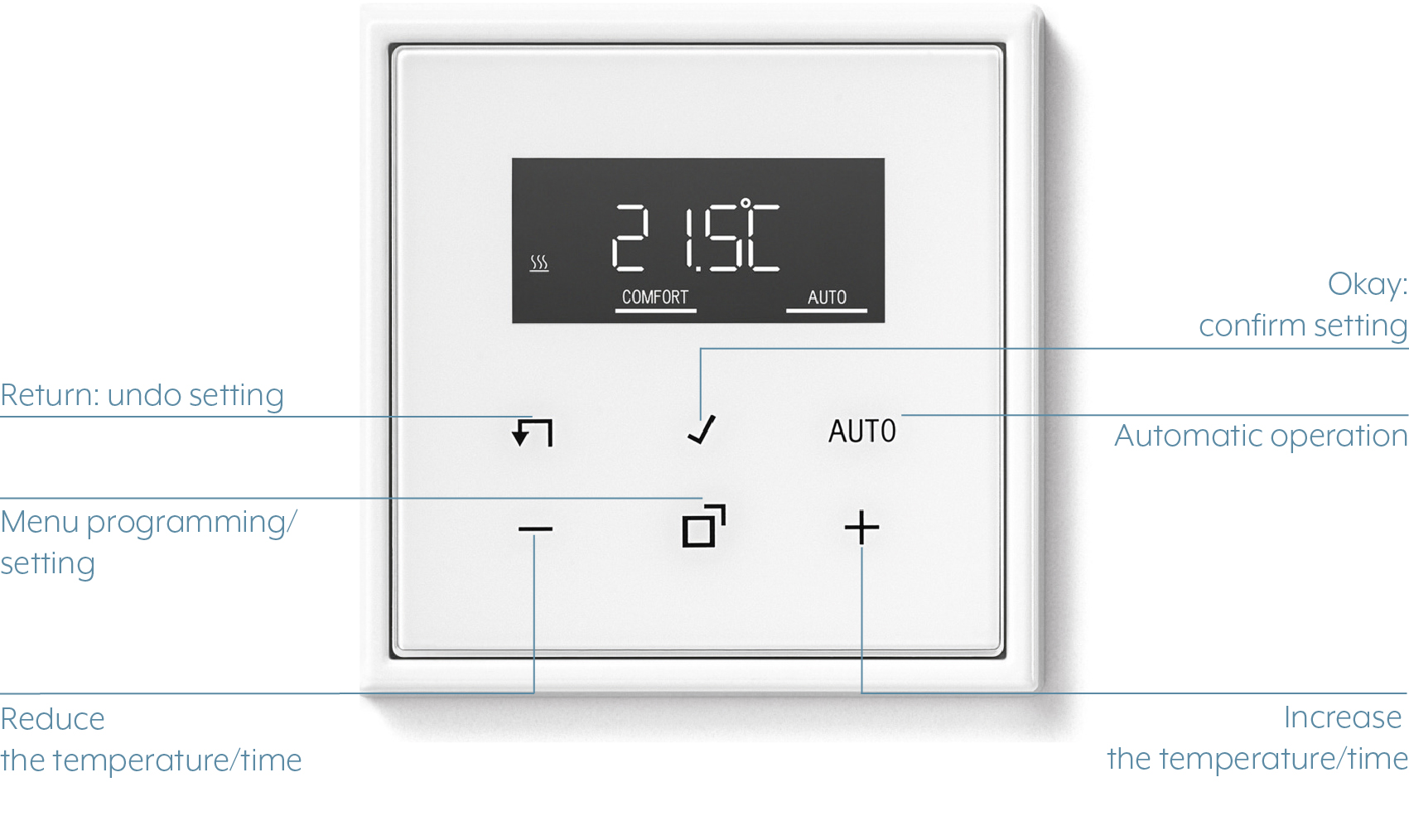
The JUNG HOME room thermostat display is a cover from JUNG HOME with a large digital display and six operating areas.
You can configure the displayed temperatures or times in the menu using the plus and minus button. Using the middle bottom operating area Programming / Settings Menu, you reach the menu in which you can select and configure various functions such as the astro function or the disabling function.
You confirm the settings with the OK button. Using the Reset button, you can undo the adjustments and reset the changed functions to the factory settings.
You can change to the automatic mode using the Automatic button.
YOU WANT TO… | IMPLEMENTATION | FURTHER INFORMATION |
|---|---|---|
... increase the setpoint temperature. | Tap the Plus button for less than one second. | The setpoint temperature is increased by 0.5 °C for each tap of the button. During cooling, you cannot increase the set temperature using the plus button. |
... reduce the setpoint temperature. | Tap the Minus button for less than one second. | The setpoint temperature is reduced by 0.5 °C for each tap of the button. During cooling, you cannot increase the set temperature using the minus button |
... call up the comfort temperature. | Tap and hold the Plus button for longer than one second. |
|
... call up the ECO temperature. | Tap and hold the Minus button for longer than one second. |
|
... activate / deactivate the automatic operation. | Press the Automatic button. | The automatic operation cannot be activated if no switching times are saved. |
... reset the switching times to factory settings. | Press and hold the Reset button and the AUTO button simultaneously for longer than ten seconds. | A countdown starts in the display. |
... display the time continuously. | Tap and hold OK and Reset buttons simultaneously for ten seconds. | Pressing again switches off the display two minutes after the buttons were pressed. |
... activate the button lock. | Tap the Menu button and then OK. Tap the Plus or Minus button until "YES" is shown on the display. Tap the OK button to confirm the activation. | The display shows LOCK. Alternatively, activate the disabling function in the menu with the Lock selection. |
... deactivate the button lock. | Tap and hold the Minus and Auto buttons simultaneously for longer than one second. |
|
... change the time. | Tap the Menu button and select "Set". Confirm the selection by tapping the OK button and then make the configurations. Confirm the new time by pressing the OK button. | In the event of power failure, the time is maintained for at least four hours. |
... change the temperature parameters. | Tap the Menu button and select TEMP. Confirm the selection by tapping the OK button. Change the setpoint value by tapping the Plus or Minus button. Confirm the new temperature by tapping the OK button. |
|
... Change parameters for control. | Tap and hold the Menu and Reset buttons for longer than ten seconds. | A countdown from 9 to 0 is counted down on the display. |
... switch between setpoint and actual temperature and the time. | Tap and hold the OK button and the AUTO button for longer than ten seconds. | A countdown from 9 to 0 is counted down on the display. |
... switch on the display continuously and switch it off after 2 minutes. | Tap and hold the OK button and the Reset button for longer than ten seconds. | A countdown from 9 to 0 is counted down on the display. |
... restore the factory settings of the device. | Tap and hold the Auto button and the Reset button for longer than ten seconds. | A countdown from 9 to 0 is counted down on the display. |