Application 1: Temperature comparison of different rooms
For this application, you need KNX devices with a temperature sensor (e.g. KNX push-button F10, KNX push-button sensor F40, KNX push-button sensor F50 or KNX presence detector Mini Universal).
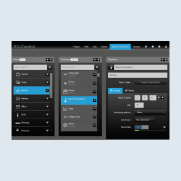
Navigate in SV Control to Areas & Functions to activate data storage.
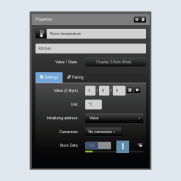
On the Areas & Functions tab, select the Function whose data you want to save.
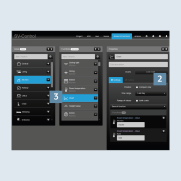
Set the slider of Store data1 to "On".
Create a new function of type line chart2 and add the previously selected functions.
Change the display properties of the charts(e.g. displayed time range) according to your requirements.
Allocate the function either to an existing area3 or create a new area.
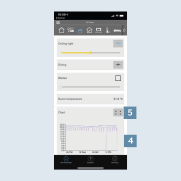
Call the SV Home user interface. As soon as the data are saved, they are stored on the Smart Visu Server and can be displayed in a chart4.
You can get more detailed information using the full-screen mode5.