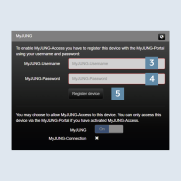
Activation of the MyJUNG account in the SV Server
After you have registered with MyJUNG, now register the account on your Smart Visu Server.
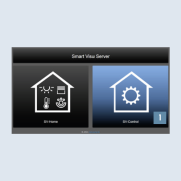
- Call the SV Server using the web browser of your terminal device (PC, laptop, tablet).
To do so, enter the address http://sv-server.local or the IP address of the SV Server allocated by the router. - If the SV Server is protected by a password, enter this.
- Select the
SV controlbutton 1.
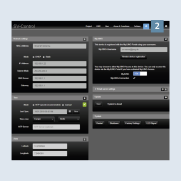
- Navigate to
Configuration Management2 in SV-Control.
- Enter your
user name3 and your associatedpassword4. Then confirm with theRegister devicesbutton 5.